See Bloom on your networks.
There are two ways to see Bloom, and both start here.Create a free workspace in about two minutes — no card — connect your first network, and schedule a post that publishes to any of Bloom’s 18 networks. Or book a guided walkthrough: tell us the networks you post to and your team size, and we will show the publishing loop, the four-state approval chain and click-to-lead attribution against your own setup. The walkthrough uses the same contact form every “talk to us” link on the site does — there is nothing new to sign up for to ask a question.
What a Bloom walkthrough shows.
A demo is only useful if it is your networks on the screen, not a canned tour. Whether you self-serve or book a session, these are the four surfaces worth seeing, each one a checkable claim rather than a slide.
One idea, tailored to 18 networks
Compose once and watch Bloom refit the post per network and block anything that will not fit before it is stored. All 18 publish — there is no connect-only tier. See the whole table on the networks page.
The four-state approval chain
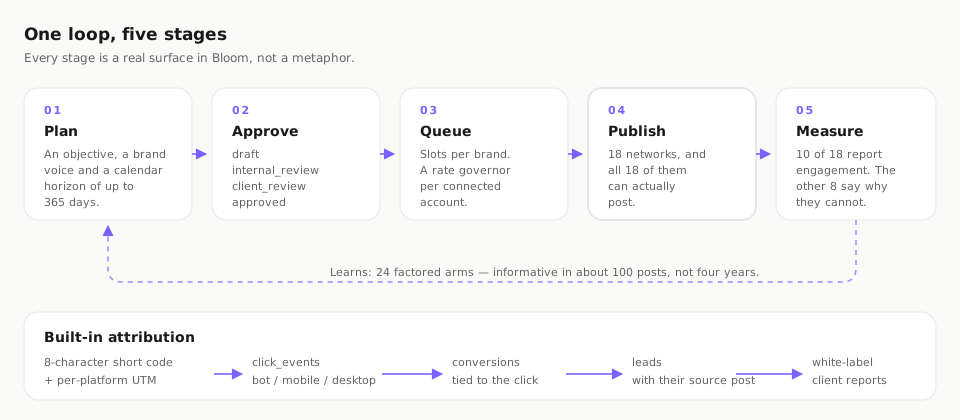
Draft, internal review, client review, approved — with five roles checked against eight actions, so a client can sign off without getting the publish button. It is the surface agencies ask to see first.
A queue that protects the account
A per-account rate governor and a cap of ten catch-up posts per five-minute tick are what keep an automated queue from getting a business account suspended. The constants are on the publishing page.
Click-to-lead attribution
Bloom’s own short links follow a click through to a conversion and a named lead, then roll up into a white-label report — the part most schedulers leave to a separate tool and a spreadsheet.
Start free in about two minutes.
The quickest demo is the real product. A free workspace needs no card, and you can connect a network and schedule your first post before a sales reply would have arrived. Nine networks connect with one-click OAuth and nine take a pasted credential.
No card, no Autocloz account
Bloom runs on its own application and its own sign-in. You never touch the Autocloz CRM to use it, and there is no card to start. The Bloom overview walks the whole loop if you want the map before you begin.
Your accounts stay yours
Each network connects with its own sign-in, and credentials are stored with AES-256-GCM under a scrypt-derived key. Disconnecting an account from inside Bloom removes its connection.
Book a guided walkthrough.
Prefer a person? Book a walkthrough and we will tailor it to your setup. The booking uses the same contact form as every “talk to us” link on the site — there is no separate system and nothing new to create. Bringing three things makes the time count.
So we show which publish, which report engagement, and which feed the inbox — against yours.
Roles and the four-state approval chain, set up for how your team and clients actually work.
Reach, sign-off or lead attribution — we lead with the surface that matters to you.
Ready when you are: book a walkthrough through the contact form, or jump straight in and create your free workspace. If you are still deciding between tools, the alternatives hub and the comparisons with Buffer, Hootsuite and Later are the honest, side-by-side version, and why Bloom is built differently makes the case.
What Bloom will — and will not — do.
A demo that hides the limits just moves the disappointment to week two. These are the refusals, stated before you book rather than after you switch.
No TikTok / IG Stories
No adapter and no Stories code path today.
No FB / LinkedIn video
Video publishes on Instagram Reels and YouTube Shorts only.
No cold DM outreach
Not available on any of these platform APIs.
No link-in-bio page
Bloom does short-link attribution instead.
What Bloom does do, it does for everyone: all 18 networks publish, 10 report engagement, 7 feed the unified inbox, and every click can be traced to a named lead. No guaranteed rankings, reach or lead counts are implied — a walkthrough shows the product, and your numbers come from your own accounts.
Demo questions, answered plainly.
How do I see a Bloom demo?
Two ways. The fastest is to create a free workspace at bloom.autocloz.com — no card, and you connect your first network and schedule a post in a couple of minutes. If you would rather be walked through it, book a guided walkthrough and tell us the networks you post to and your team size, and we will tailor the session to exactly that.
What should I have ready for a walkthrough?
Three things make a walkthrough useful: the networks you actually post to (so we can show which of the 18 publish, which of the 10 report engagement back, and which of the 7 feed the inbox), your team size and whether clients need sign-off (so we can show the four-state approval chain and roles), and whether you want click-to-lead attribution turned on. None of it is required — it just makes the time count.
Is a walkthrough a sales call?
It is a product walkthrough. Bloom is free to start, so there is no pricing to negotiate — the session is for seeing the product against your own networks and answering the questions a signup page cannot. If Bloom is not the right fit, we would rather tell you than sign you up.
Do I need an Autocloz CRM account to try Bloom?
No. Bloom runs on its own application at bloom.autocloz.com with its own sign-in. You create a Bloom workspace directly; the CRM is a separate product for outbound and is never required to use Bloom.
What will a demo honestly not show?
Bloom does not publish to TikTok or Instagram Stories, cannot upload video to Facebook or LinkedIn, offers no cold or unsolicited DM outreach, and has no link-in-bio page. A walkthrough will say so plainly rather than let you discover a gap after you switch.
See it on your own networks.
Start a free workspace in about two minutes — no card, no Autocloz account — or book a walkthrough and we will tailor it to the networks you post to and the way your team works.